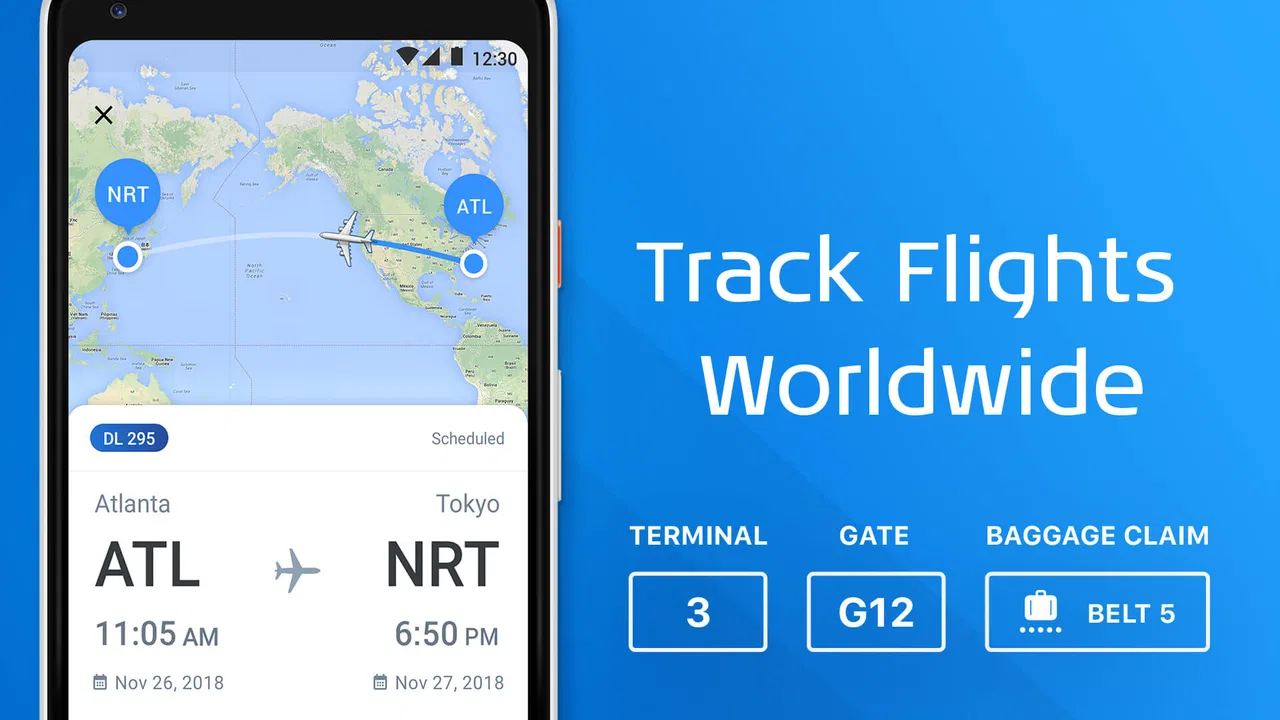
The Flight Tracker
- 3.9
- Rating
- 5.00M
- Installs
- Free
- Price

 Analysis by App-foxy
Keeping up with a flight is one of those small travel tasks that becomes surprisingly stressful when the information is scattered between an airline app, an airport website, email confirmations, and messages from the person waiting at the other end. The Flight Tracker, made by Impala Studios, takes a narrower and more practical approach: it gives me one place to follow a flight and check whether an arrival or departure has changed. After using it as a travel companion rather than treating it as a complete airline replacement, I found it most useful when I wanted a quick status check without digging through several services.
This is a free Travel & Local app for everyone, with optional in-app purchases ranging from $0.99 to $31.99 per item. It has been available since August 22, 2014, and the current version is 3.1.0 for devices running Android 8.0 or later. Its average score is 4.0 from around 34 thousand ratings, and it has passed 5 million installs. Those figures suggest that it has found a broad audience, but they do not mean it will suit every kind of traveler. Its value depends on whether you want a focused flight-monitoring tool or a full travel-management system.
My basic workflow for following a flight
I start by treating the app as a monitoring screen, not as the place where I plan an entire trip. When I have a flight number or the relevant route information, I use that to locate the journey I care about. The important habit is to add the flight early enough that I can check it before leaving home, rather than waiting until I am already rushing through the airport.
You May Also Like

 Blood Strike: 2.5 Anniversary
Blood Strike’s Loadouts Turn Every Drop Into a Tactical Gamble
A close look at Blood Strike’s custom loadouts: how fast access to signature weapons reshapes its battle royale rhythm, rewards preparation, and narrows the gap between fights.

 Pandora - Music & Podcasts
Pandora’s Music Is Easy to Start, but Harder to Recover
Pandora’s strength is its low-effort path from a seed to a station. Its weak spot is how much confidence it asks you to place in connection, setup, and quiet recovery.

 8 Ball Pool
 Is Built on Rivalries, Rematches, and Routine
A close look at the rivalries, rematches, shared routines, and unanswered safety questions that turn a quick pool match into a persistent mobile community.

 Samsung Music
’s Quiet Strength Is Playing What You Already Own
Its reach comes less from spectacle than from dependable access to a personal library. That simplicity is both the app’s strongest retention engine and its ceiling.

 AccuWeather: Weather Radar
AccuWeather Review: A Quick, Clear Forecast for Everyday Decisions
For everyday plans, the best forecast is the one you can understand quickly. AccuWeather makes rain timing, radar, and local conditions easy to act on, with a few trade-offs.

 Hill Climb Racing
Why Hill Climb Racing Still Turns Crashes Into One More Run
A tiny car, a bumpy hill and one more upgrade: Hill Climb Racing keeps resurfacing because its simple chaos makes every near-miss feel personal.
More From Our News Desk



That simple timing makes a difference. A flight tracker is most helpful when it becomes part of a repeatable routine: check the flight after packing, check it again before heading to the airport, and then use it for a quick arrival or departure update while traveling. I do not need to keep refreshing a browser tab or search the airline manually each time. The app is at its best when it reduces those small interruptions.
For a person collecting someone from an airport, the arrival view is especially practical. Instead of leaving home based only on the scheduled landing time, I can check whether the flight is still progressing as expected. That does not remove the need to account for baggage collection and traffic, but it helps avoid the classic mistake of arriving far too early because the aircraft has been delayed or the schedule has shifted.
For my own departure, I use it as a second check before relying on the airport journey. I still consider the airline’s instructions and the airport’s own information more important for check-in, security, gate changes, and boarding rules. The tracker’s role is to answer the immediate question, “Is this flight still moving according to plan?” That clear division keeps expectations realistic.
What the app does well in everyday travel
The strongest part of the experience is its focused purpose. I am not forced to work through a large booking interface when all I want is a status update. That makes it suitable for a friend or relative who is not the person holding the booking but still needs to know when a plane is expected to arrive.
A realistic example is meeting a family member after a long trip. I can monitor the flight while working or commuting, then make a better decision about when to leave. If the aircraft is delayed, the information can prevent a wasted journey. If the flight is on time, I can prepare for the original arrival window instead of repeatedly asking the traveler for updates while they are still in the air.
Another useful situation is a multi-person trip where only one traveler has access to the airline account. The rest of the group may not need booking management, seat details, or payment information. They simply need the flight’s progress. A dedicated tracker can be easier to share as a common reference point, provided everyone understands that operational details may still belong to the airline.
The best habit is to use The Flight Tracker as an early-warning tool, not as your only source of travel instructions. That distinction is easy to overlook. A status can tell me that a departure is delayed, but it may not explain what I should do about check-in, a missed connection, a changed gate, or a rebooking. For those decisions, I turn to the airline, airport, or booking provider.
Settings and preparation that are worth checking
I would not wait until the day of travel to discover how the app presents updates. After adding a flight, I take a moment to review what information is visible and how quickly I can reach the relevant journey again. The precise value comes from reducing the number of taps between opening the app and seeing the flight I actually care about.
If I am tracking several journeys, I keep their purpose clear in my own routine. For example, I might use one flight for my departure and another for a pickup. The useful trick is not to treat every saved item as equally urgent. I focus on the next flight that affects a real decision, such as when to leave for the airport or when to start driving to arrivals.
I also check the app before entering a low-connectivity situation. Airport Wi-Fi, mobile coverage, and roaming can be inconsistent, so I prefer to look at the latest available status while I have a reliable connection. I do not assume that a previously displayed update will remain current if the phone cannot reach the service. That is a general travel precaution, but it matters particularly for a tool whose usefulness depends on fresh information.
Another practical step is confirming the flight identity carefully. Similar routes, codeshare arrangements, and return flights can make a quick search confusing. I compare the route and scheduled timing with my booking before trusting the result. This is one of those small checks that experienced travelers make automatically, because following the wrong flight can create a false sense of security.
The free entry point makes it easy to test this workflow without committing money. The optional purchases may be useful to people who want more from the app, but I would first use the free experience during an ordinary trip and decide whether it fits my habits. Paying for an option is only worthwhile if it removes a repeated inconvenience for the way I personally travel.
Shortcuts in practice: fewer checks, better timing
The fastest pattern I found is to check at decision points rather than constantly. Before leaving for the airport, I want a current view. After reaching the airport, I may check again if the schedule has become uncertain. When tracking an arrival for pickup, I check before setting off and once more when the journey is close enough to affect my timing. Refreshing every few minutes rarely improves the decision.
This approach also helps with battery and attention. Travel apps compete with boarding passes, maps, messages, and translation tools, so I do not want a flight tracker demanding constant interaction. I use it to answer a specific question, then close it. That makes it a calm utility instead of another source of notification fatigue.
For regular travelers, the real shortcut is consistency. I use the same sequence every time: identify the correct flight, review the current status, note the planned arrival or departure, and then confirm important changes through the airline or airport when necessary. Once that pattern becomes familiar, the app is quick even when I am tired or traveling in an unfamiliar place.
It is also helpful for people who are not comfortable with airline websites. A family member can use a simpler status-focused tool without navigating booking menus or remembering an account password. I would still show them how to recognize the route and scheduled time, because a simple interface does not protect against selecting the wrong journey.
Compared with searching the web manually, the app feels more convenient for repeated checks because the task is centered on flights rather than general search results. Compared with an airline’s own app, it can be more neutral when I am monitoring somebody else’s journey. The trade-off is that the airline remains the stronger source for booking-specific actions and official instructions. Compared with a full itinerary organizer, The Flight Tracker is less ambitious but also less cluttered when status is the only thing I need.
Where the focused design reaches its limits
The first limitation is scope. Tracking a flight is not the same as managing a trip. I would not choose this app alone if I need reservations, boarding passes, hotel details, car hire, loyalty information, or a complete itinerary. A travel organizer or airline application will be better for those jobs because it connects more directly to the booking.
The second limitation is that a status update does not automatically explain the consequences of a disruption. If a departure changes, I may still need to contact the airline, check connection rules, or understand whether the new timing affects transport at the destination. The app can help me notice that something has changed, but I remain responsible for deciding what action to take.
There is also a difference between tracking a flight and receiving every airport announcement. Gate assignments, boarding calls, security queues, baggage belts, and terminal instructions are operational details that may be handled more reliably by the airline or airport. I would never use a third-party tracker as a reason to ignore a message from the carrier.
Travelers who fly only once every few years may find a general search engine or the airline’s own app sufficient. If I already have a booking application that provides dependable updates and I never monitor flights for other people, adding another tool may not simplify anything. The Flight Tracker makes more sense when I repeatedly check flights, support family members, or want a separate view that is not tied to one airline account.
People should also consider how much they value customization before paying for optional items. The app is free to start, but purchases are available, so I would judge them by a concrete need rather than assuming every extra is essential. If my travel pattern is occasional and simple, the free experience may be enough. If I track many journeys or depend on timely reminders, I would test how well the available options match that routine before spending.
Who will get the most from it
I recommend it most readily to frequent travelers who want a dedicated status screen, people who regularly collect passengers, and families coordinating around one flight. It is also a sensible choice for someone who wants a lightweight companion alongside an airline app rather than replacing it.
It is less suitable for a traveler looking for one application to handle every part of a holiday. Business travelers with complicated connections may prefer a tool built around complete itineraries. Passengers who need immediate rebooking, account access, or carrier-specific support should keep the airline’s app close at hand.
For first-time users, my advice is to install it before the trip, follow one known flight, and see whether the workflow feels clear. Do not wait until a delay has already caused confusion. That small trial reveals whether the app gives you the right amount of information and whether you are comfortable using it alongside official travel sources.
My final view after building a repeatable routine
The Flight Tracker succeeds because it stays close to one useful travel question: what is happening with this flight? Impala Studios has made a free app that can fit naturally into a departure or pickup routine, and its broad install base shows that the idea is easy for many people to understand. I appreciate it most when I use it deliberately, checking at useful moments instead of expecting it to manage the whole trip.
My verdict is positive with a clear condition: choose it for monitoring, not for complete travel administration. The strongest workflow combines the app’s quick status checks with the airline’s official booking and disruption tools. Once I make that distinction, the experience becomes straightforward and genuinely helpful.
If you often need to know whether a flight is on time, delayed, arriving, or departing, I think it is worth trying. If you need boarding passes, rebooking, detailed itinerary control, or airport-specific instructions in the same place, a different travel app will probably serve you better. For the right user, though, its focused role is exactly what makes it useful: less searching, better timing, and fewer unnecessary messages during a busy travel day.
FAQs for The Flight Tracker
01What features does The Flight Tracker offer to enhance my travel experience?
The Flight Tracker provides real-time flight updates, gate and terminal information, and detailed flight status. It also offers airport maps, weather forecasts, and customizable notifications. These features ensure travelers have all the necessary information at their fingertips, making it easier to manage travel schedules and stay informed about any changes.
02Is The Flight Tracker compatible with both Android and iOS devices?
Yes, The Flight Tracker is available for both Android and iOS platforms. The app is designed to work seamlessly across devices, ensuring you receive consistent and reliable updates regardless of your smartphone or tablet model. Simply download it from the Google Play Store or Apple App Store.
03How accurate is the real-time flight information provided by The Flight Tracker?
The Flight Tracker is known for its accuracy and reliability. It sources data from multiple trusted providers to deliver real-time updates on flights, including delays, cancellations, and gate changes. However, it's always a good idea to verify critical information directly with the airline or airport when possible.
04Can I track flights for multiple airlines and airports simultaneously?
Absolutely. The Flight Tracker supports tracking for numerous airlines and airports worldwide. You can manage multiple flights at once, making it an ideal tool for frequent travelers or those coordinating travel for others. The app’s user-friendly interface allows easy navigation between different flight details.
05Does The Flight Tracker offer offline access to flight information?
While The Flight Tracker excels in providing real-time data, some features may be limited offline. However, the app saves previously accessed information, allowing you to view recent flight details without an internet connection. For the most up-to-date information, an active internet connection is recommended.
Pros
- Comprehensive flight details available.
- Real-time status updates.
- User-friendly interface design.
- Customizable notifications.
- Supports multiple languages.
Cons
- In-app ads can be intrusive.
- Premium features are costly.
- Occasional data sync issues.
- Limited airport information.
- Requires constant internet connection.

The Flight Tracker
Gallery